Multistreaming for Churches
Streaming to multiple platforms at once doesn’t have to be hard, not if you use the right tools. OBS Multistream is a free plugin for OBS that allows you to stream to multiple destinations (e.g. Facebook, YouTube, and your website) all at once. You can have it set up in 10 minutes thanks to this guide.
Firstly, why bother multistreaming? Many of us (tech volunteers and leaders) are always wanting to do the best for our churches and for God. We have all faced the difficult decision of whether to live stream on YouTube or Facebook. Well, why not stream on both? By doing this, you massively increase your potential viewership. My own church went from 100–120 live viewers each Sunday to over 600 because we started streaming to both Facebook and YouTube. So, this is how you do it!
Download OBS Multistream
Click the link here:
https://github.com/sorayuki/obs-multi-rtmp/releases/
to download OBS Multistream.
(I am not the creator and am not responsible for outbound links.)
Then run the installer. (I left all the options as default.)
Finally, launch OBS, select Docks > Multiple Output, and input your settings.
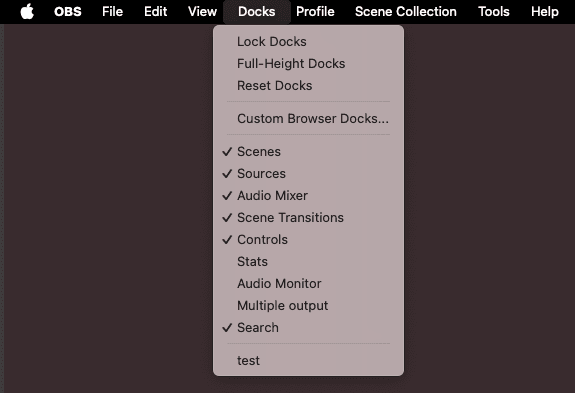
OBS Dock Menu
OBS Multistream Settings
Choose what you want to title your output (“Facebook” in my case), then select your encoder. By selecting “Reuse streaming encoder as OBS”, you do not use any significant extra computer resources, only about 2% more CPU.
However, you do use double the bandwidth and upload speed. For example, for a 6 Mbps 1080p stream, you will now use 12 Mbps, as you are sending two 6 Mbps streams.
Next, enter your streaming URL and stream key (you can get this from Facebook, YouTube, or wherever you are streaming to).
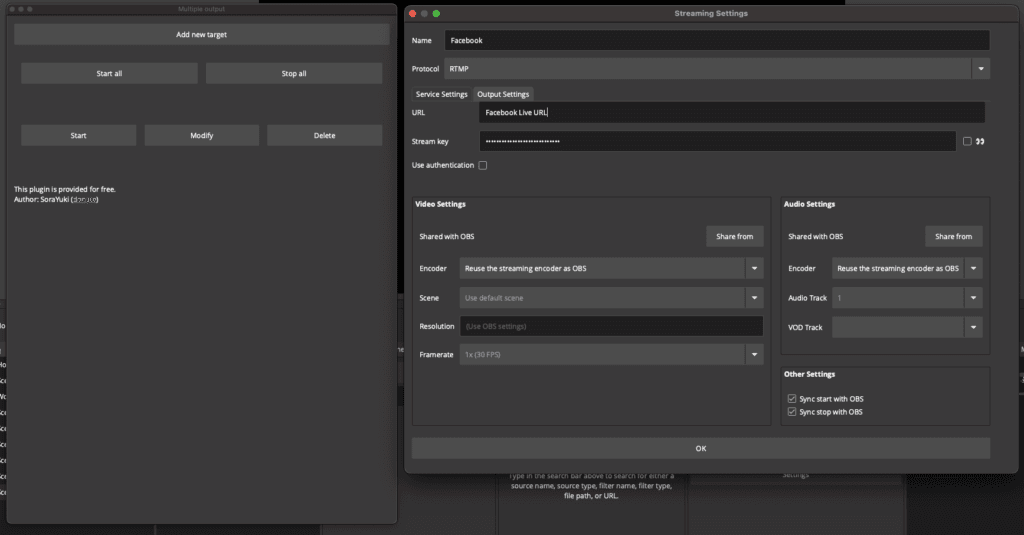
Ensure “Sync start/end with OBS” is selected, click OK, and you’re all set. When you start your OBS stream, your second stream will start automatically too!
Make sure you have a fast enough upload speed to handle both streams.
Why not checkout my blog post on Youtube vs Facebook for Church Livestreaming.
FAQ
1080p vs 4k?
I you are a church just starting out I recommend 1080p, this is enough to appeal clear on phones, tablets and smaller TV’s. It also carries a lower const and internet requirements. I would choose a bitrate between 6-8mbitps (My church uses 6mbitps and it looks great) depending on how much movement there is in your video. (The more movement the more bitrate you need.)
If you want to take the next step, and have the budget to buy quality gear. 4K is a great choice, it will look sharp on any screen and give you massive flexibility in post. However, you need an upload speed that can handle it.
Check out YouTube’s recommendations here.
How much does Facebook and Youtube cost?
Great news! Both YouTube and Facebook are FREE, they cost nothing. So get started straight away.
What platforms do you recommend?
I recommend the following 3 platforms: Youtube, Facebook and you own website.
Youtube – Because it has great discoverability once the stream ends. This makes Youtube useful for long-term archival and on-demand content.
Facebook – Because it has a strong community. This includes sharing, likes, comments and live chat .
Your Website – This provides a platform for your stream that YOU control, no matter what happens to Youtube or Facebook, you can still go live.
About the Author: